Email looks like a web page. It is not one.
A layout that works in Chrome can lose spacing in classic Outlook for Windows. A button can behave differently after forwarding. Gmail supports a defined subset of CSS and may ignore unsupported properties. Dark mode can alter colors chosen by the designer. Every new campaign inherits this old problem.
Migma first tried to solve the creative side with AI. That exposed a harder systems problem: generating better copy and layouts does not make the resulting code safe for every inbox.
So we built Zinn, Migma's email language and compiler layer.
Short answer
Zinn separates what an email should be from how each inbox needs it encoded.
AI and visual tools work with email concepts such as sections, columns, images, text, buttons, spacing, brand styles, and responsive behavior. Zinn turns that structured intent into production email HTML with table layouts, inline styles, Outlook-specific fallbacks, responsive rules, and dark-mode metadata.
This split matters. A model can focus on message and design. A deterministic compiler handles client-specific code. Migma users edit an email, not a wall of compatibility markup.
Email HTML still has no single browser
Modern web development has a common target: standards-based browser engines. Email has many targets with different rules.
Microsoft documents that classic Outlook uses Word's HTML processing engine. That affects ordinary web techniques including margins, padding, line height, background images, and rounded buttons. Some layouts need table cells or Outlook-specific VML fallbacks to render as intended.
Gmail documents its own supported set of CSS selectors, properties, and media queries. Unsupported properties or selectors may be ignored. Other clients add their own behavior for fonts, image blocking, dark mode, and responsive layouts.
That fragmentation creates a deceptive workflow:
- Design looks correct in browser preview.
- Generated HTML appears valid.
- Same email reaches several inbox engines.
- Each engine interprets part of it differently.
- The team discovers breakage during QA, or after send.
Microsoft's own guidance describes post-processing HTML to work around client limits and still recommends validating custom code across email clients. The problem is not one missing CSS trick. It is unstable translation between design intent and inbox behavior.
Sources: Microsoft email-rendering guidance, Microsoft Outlook HTMLBody guidance, Gmail CSS support.
Why asking AI for final HTML was wrong boundary
An AI model can write HTML. That does not mean final HTML should be its primary design surface.
When one prompt must produce final email code, the model is doing several jobs at once:
- Interpret the campaign goal.
- Write copy.
- Choose a visual hierarchy.
- Apply brand rules.
- Build a responsive layout.
- Remember Outlook exceptions.
- Inline CSS where required.
- Preserve variables for the chosen sending platform.
- Avoid unsupported combinations.
Those goals compete. More client-specific markup also creates more surface area for inconsistent edits. A small change to one section can disturb code unrelated to visible request.
We wanted a cleaner boundary: AI should express email intent in a constrained form. The compiler should own mechanical compatibility work.
That became Zinn.
How we designed Zinn
We did not begin by inventing punctuation. We began with failures seen in real emails.
1. Start from inbox behavior
The first question was not “What syntax looks elegant?” It was “What must always be true when this email leaves Migma?”
Core requirements included:
- Stable table-based layout for clients that do not handle browser layout well.
- Inline styles where inboxes expect them.
- Responsive behavior with safe fallbacks.
- Outlook-specific structures for features Word cannot paint like a browser.
- Useful output when images or custom fonts do not load.
- Brand colors that remain readable through common dark-mode changes.
- Preservation of personalization variables through export.
The language exists to capture the intent behind those requirements. The compiler exists to enforce output rules.
2. Keep vocabulary email-native
Zinn describes email building blocks, not arbitrary web pages. It needs to represent content hierarchy, images, buttons, columns, spacing, backgrounds, variables, and reusable brand choices.
Narrower vocabulary is deliberate. Fewer valid shapes make generated output easier to validate, edit, and compile. It also gives AI agents a smaller, clearer target than thousands of possible HTML and CSS combinations.
3. Make the compiler own ugly code
Production email HTML is verbose because it carries years of client workarounds. That complexity still has to exist. It should not be repeatedly written by a marketer, designer, or model.
Zinn lets the compiler generate required tables, inline styles, conditional structures, responsive rules, and fallbacks from one editable source. The same source can produce output for preview, preflight, export, and send.
4. Send every creation path through the same system
Migma can start from a prompt, Figma frame, screenshot, HTML file, Claude design, previous email, or reference. These inputs look different, but they should not create separate rendering standards.
Migma turns each path into an editable email, then renders it through the same email engine. Imported HTML does not remain a fragile foreign blob. An AI-generated design does not get a special browser-only path. Visual edits do not bypass the compatibility layer.
Source: How Migma creates emails, Migma client compatibility.
5. Treat validation as a separate product step
Compilation reduces risk. It does not remove the need to review.
Migma's Email Preflight checks client previews and flags compatibility, link, content, and deliverability signals before export or send. The user can fix issues, run checks again, then send a controlled test.
This distinction matters: the compiler gives predictable construction; Preflight gives evidence about the current result.
Source: Migma Email Preflight.
One source, several inbox targets
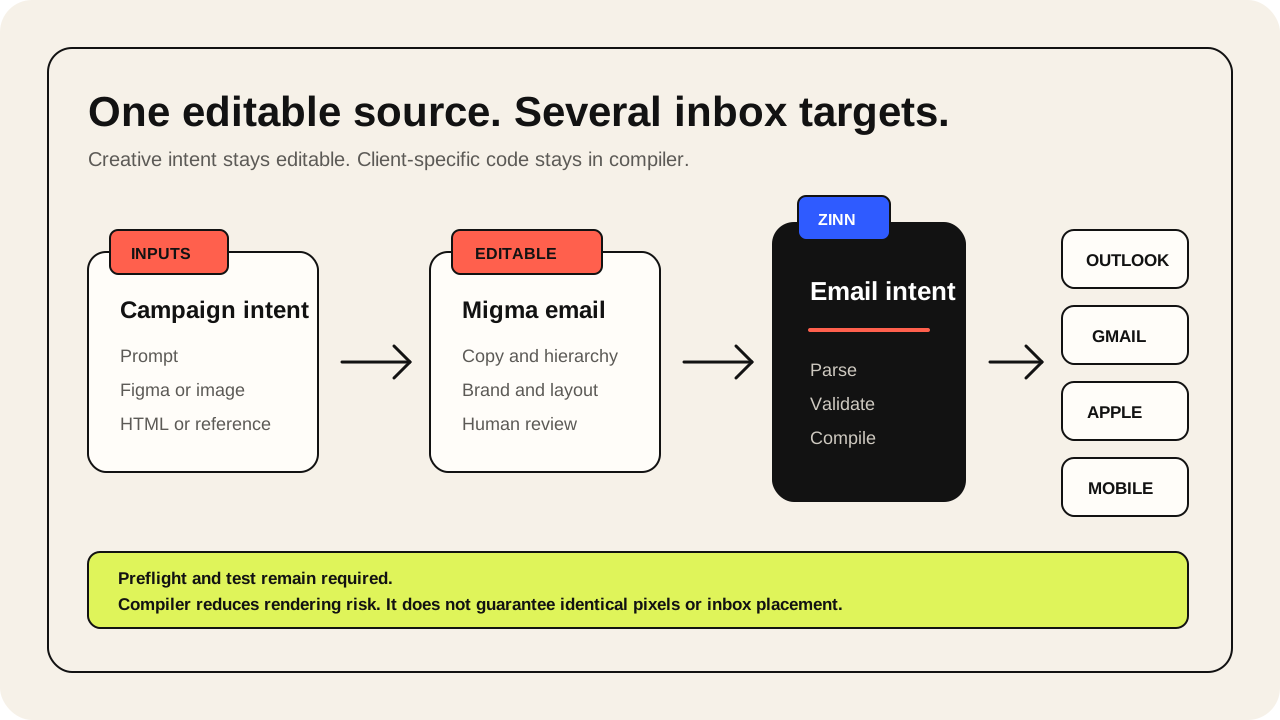
Conceptual path looks like this:
| Layer | Owns | Does not own |
|---|---|---|
| Campaign brief | Audience, offer, proof, CTA, constraints | Client-specific HTML |
| AI and visual editor | Copy, hierarchy, layout intent, brand application | Outlook workarounds |
| Zinn | Email structure and validated design intent | Sending reputation |
| Compiler | Tables, inline styles, responsive rules, client fallbacks | Campaign approval |
| Preflight and test | Rendering evidence, links, warnings, human review | Guaranteed inbox placement |
| Export or send | Approved artifact and destination | Creative strategy |
Keeping these responsibilities separate prevents one tool from pretending it solved everything.
What Zinn changes for AI agents
AI works better when output space has clear rules.
Raw email HTML gives a model many ways to express the same visible idea. Some work in a browser but fail in an inbox. Some render correctly but are hard to edit. Some preserve the design but break personalization or exceed practical email limits.
An email language gives an agent a stronger contract:
- Use known email components.
- Keep hierarchy explicit.
- Apply brand values consistently.
- Produce output that can be parsed and validated.
- Return structured errors when intent is invalid.
- Recompile same source after a targeted edit.
This is why Zinn is more than compressed HTML. It is the boundary between probabilistic generation and deterministic rendering.
What Zinn solves, and what it cannot promise
Zinn solves repeatable construction of email-safe output inside Migma. It reduces dependence on hand-written tables, inline styles, Outlook conditions, and one-off fixes for each creation path.
It does not make every inbox display identical pixels.
Clients can still:
- Block images.
- Replace unsupported fonts.
- Recolor content in dark mode.
- Rewrite markup when message is forwarded.
- Ignore unsupported CSS.
- Clip or transform unusually large messages.
Rendering also cannot guarantee inbox placement. Sender reputation, authentication, consent, list quality, complaint rate, content, and sending infrastructure remain part of delivery.
Migma optimizes for reliable, readable output across major webmail, desktop, and mobile clients. The final workflow should still include Preflight, a test send, and human approval.
Why this became a product decision, not an engineering side project
Zinn changed what Migma could promise at the product level.
Without a shared rendering layer, every new input creates another conversion problem. Prompt generation, Figma import, screenshot recreation, HTML import, visual editing, agent actions, and ESP export can drift into separate implementations.
With one email language and compiler, those paths converge. The team can improve rendering behavior once and apply that improvement across the email creation workflow.
That foundation shaped Migma's 2026 launch story. Product Hunt discussion focused on prompt-to-email creation, email preflight, and an in-house compiler as the core difference between general AI output and email production software. Public interest does not prove rendering quality, but it confirms that the problem resonates with people who have watched browser-perfect emails fail in Outlook.
Source: Migma on Product Hunt, Migma export options.
How to test the claim yourself
Do not judge an email compiler from a browser screenshot. Use a small compatibility test.
- Create an email with two columns, a branded button, a background image, a custom font, and a dark section.
- Preview desktop and mobile versions.
- Run Email Preflight.
- Inspect classic Outlook for Windows, Gmail web, Gmail mobile, Apple Mail, and dark mode.
- Send test to inboxes your audience uses.
- Record layout changes, fallback fonts, color changes, and link results.
The same test should be used for Migma and any alternative. Evidence should come from the exported email and inbox result, not vendor copy.
Final answer
Migma built Zinn because AI made the old email problem more visible, not less important.
Models can create ideas quickly. Inboxes still demand conservative, client-specific code. Asking the same model to improvise both layers creates fragile output.
Zinn gives Migma a stable middle layer: structured email intent in, production email HTML out. That lets humans and agents work at the level of message and design while the compiler handles years of inbox quirks underneath.
The old problem remains. A better abstraction makes it manageable.
Sources
- Migma: Create emails
- Migma: Email client compatibility
- Migma: Email Preflight
- Migma: Export options
- Microsoft: Troubleshoot email rendering
- Microsoft: Formatting loss in Outlook HTMLBody
- Google: CSS support in Gmail
- Migma on Product Hunt
Frequently Asked Questions
What is Zinn in Migma?
Zinn is Migma's proprietary email language and compiler layer. It separates structured email intent (such as columns, buttons, spacing, and brand styles) from the mechanical, client-specific HTML needed to render reliably across different inbox engines.
Why shouldn't AI models generate final email HTML directly?
Generating final email HTML forces an AI model to balance high-level creative tasks with low-level email quirks, such as table nesting, CSS inlining, and Outlook workarounds. This creates fragile output where minor edits can introduce severe compatibility bugs across different email clients.
How does Migma ensure compatibility across different email clients?
Every email creation path—whether generated by AI, imported from Figma, or built visually—is converted into Zinn and compiled through a single engine. Before sending, Migma Email Preflight checks previews across major clients and flags compatibility, link, and deliverability issues.
Does Zinn guarantee identical rendering in every inbox?
No. While Zinn produces safe, predictable HTML, individual email clients can still block images, substitute fallback fonts, recolor elements in dark mode, or alter forwarded markup. Deliverability also relies on factors outside of rendering, such as sender reputation and list hygiene.
How can you test an email's rendering compatibility?
Build a test email containing two columns, a branded button, a background image, a custom font, and a dark section. Run preflight checks, inspect the output in classic Outlook for Windows, Gmail web and mobile, Apple Mail, and dark mode, and verify the results with a live test send.