Introduction
As your email library grows, finding the right email at the right time shouldn't feel like a search mission. Starting today, you can organize your entire workspace automatically, bringing together the speed of AI with the structure of a well-run system.
TL;DR
- Folders: Group your emails into Favorites, Campaigns, Transactional, Sent, and more.
- Auto-Organize: Let MigmaAI analyze your emails and sort them into smart folders automatically.
- Smart Folders: Describe the kind of emails you want grouped, MigmaAI adds matching ones automatically.
- Always in Order: Your workspace stays organized as you scale, without any manual effort.
What's New
Previously, every email you generated lived in one place. The more you created, the harder it became to navigate. Now, you can group emails into folders Favorites, Sent, Campaigns, Transactional, and create new ones for whatever structure fits your workflow.
Folders:
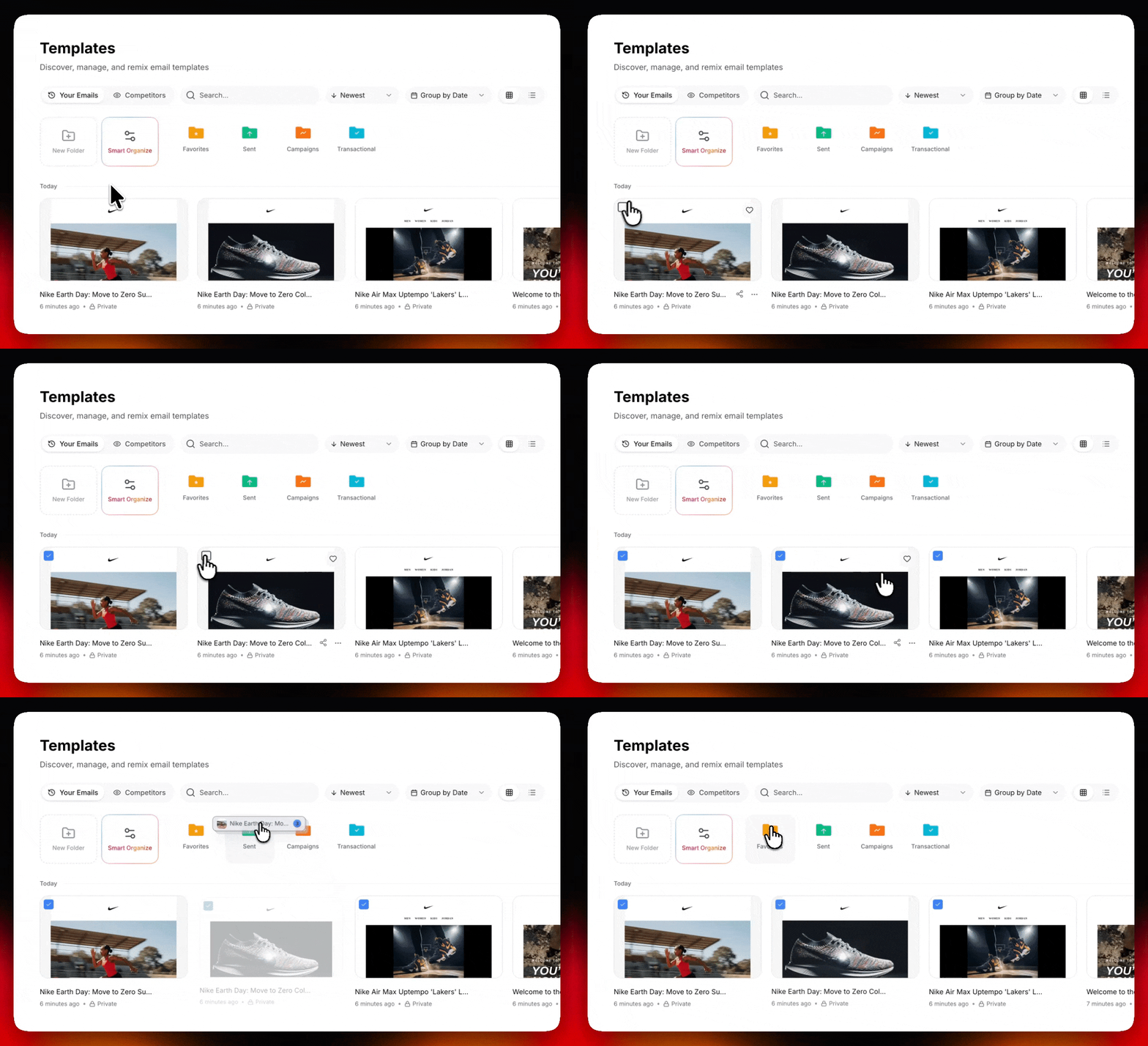
Group your emails into Favorites, Sent, Campaigns, or create your own. Your workspace, your way.
Let MigmaAI Do the Sorting:
Don't want to sort manually? You don't have to. Click Smart Organize, select Auto-Organize, and hit Start. MigmaAI analyzes your entire email library and automatically sorts everything into smart folders based on content and type. One click. Fully organized.
Smart Organize:
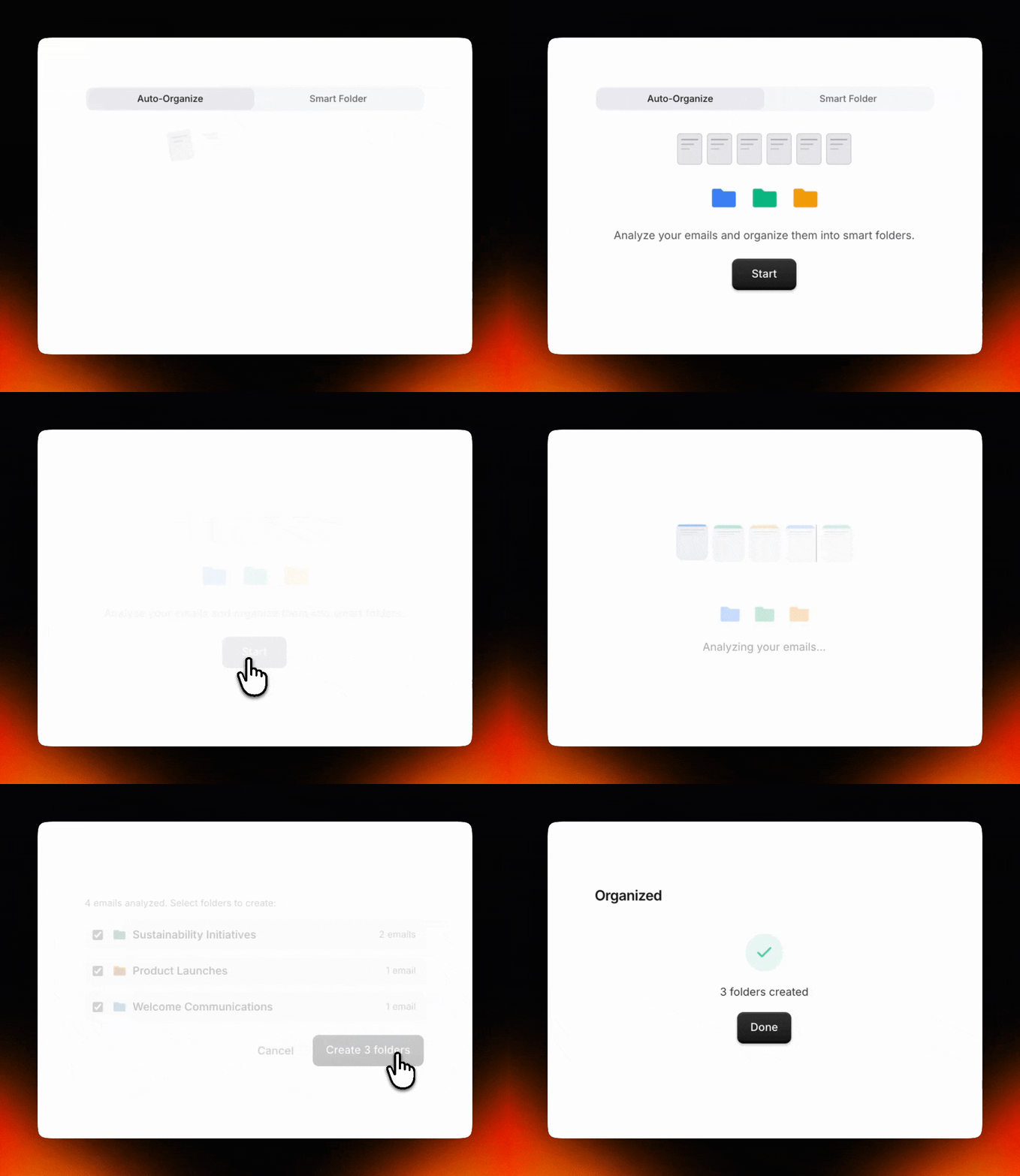
Click Smart Organize, select Auto-Organize, and hit Start. MigmaAI analyzes your entire email library and sorts everything into folders automatically.
Smart Folders: Describe It, Done

For ongoing organization, Smart Folders keep your workspace sorted automatically over time. Describe what kind of emails belong in a folder, welcome sequences, investor updates, product launches and MigmaAI adds every matching email to that folder as you create them. No manual sorting. No maintenance. Just a workspace that stays clean as it grows.
Built for Everyone
Whether you are a marketer managing multiple campaigns, a founder building sequences, or a designer organizing templates by style, Smart Organize fits naturally into how you already work. You don't need to think about organization, MigmaAI handles it so you can stay focused on creating.
MigmaAI was built to make email creation fast through AI, but a fast workflow still needs structure. Smart Organize is our answer to that. It keeps your library clean, your folders meaningful, and your focus where it belongs on the emails, not the filing.
Conclusion
Smart folders marks an important step forward for MigmaAI. Now, you can generate emails quickly with MigmaAI, refine them with the Visual Editor, test them with A/B Testing, and keep everything organized automatically, all in one platform.
Ready to try it? Open MigmaAI, click Smart Organize, and let it sort your library in one click.
Frequently Asked Questions
What is the new Smart Organize feature in MigmaAI?
Smart Organize is a system that uses AI to automatically analyze and sort your entire email library into folders. It allows you to group emails by type, such as Campaigns or Transactional, without manual effort.
How do I automatically organize my existing email library?
To organize your library, click on Smart Organize, select the Auto-Organize option, and hit Start. MigmaAI will then analyze your content and sort your emails into appropriate folders automatically.
What are Smart Folders and how do they work?
Smart Folders are folders that stay organized over time based on your descriptions. You describe the types of emails that belong there, such as investor updates or product launches, and MigmaAI adds matching emails to the folder as you create them.
Can I create my own custom folders in MigmaAI?
Yes, you can create your own custom folders to fit your specific workflow. In addition to default categories like Favorites and Sent, you can build a structure that works best for your needs.
Do I need to manually sort new emails into folders?
No, you do not need to perform manual maintenance. By using Smart Folders and describing the content that belongs in them, MigmaAI handles the filing automatically as you scale your workspace.