Migma is our best overall ChatGPT integration for email marketers who need a complete branded email, a reviewed send, and a way to use campaign results in their next design. Klaviyo is a strong option for asking questions about an existing ecommerce marketing account. Brevo is useful as a sending destination, but its documented Claude connector should not be mistaken for a verified native ChatGPT integration.
This guide is published by Migma. We rank for a specific job: moving from a conversation to editable visual email, approved delivery, and reviewed improvements. These are editorial criteria, not an independent benchmark or a claim that one tool wins every use case. Sources and plan pages were checked on November 5, 2026.
What counts as a useful email marketing integration?
An integration should connect the conversation to real work. Ask what it can read, what it can create, and what happens when the campaign needs to reach subscribers. Copy suggestions alone do not establish access to a saved brand, an email editor, the audience, or campaign results.
| Option | Best fit | Connection and review boundary |
|---|---|---|
| #1 Migma: Best overall | Designing branded emails, preparing campaigns, and improving later creative | Public Migma plugin; review access and approve each send in Migma |
| #2 Klaviyo | Live campaign and flow analysis for teams already using Klaviyo | Official ChatGPT integration; verify the current actions and account permissions |
| Brevo as a sending destination | Teams keeping their sending operation in Brevo | A separate platform workflow; no native ChatGPT listing verified in this review |
Brevo is included for the sending decision, not ranked as a confirmed ChatGPT plugin. That distinction prevents a comparison from promising a connection the reader cannot actually install.
1. Migma: Best overall when the finished email matters
Migma gives ChatGPT access to the email work around the draft: saved brands, visual creation, opted-in audiences, campaigns, and results. Follow the current Migma ChatGPT setup guide, connect through the public listing, and review the requested access in your browser.
OpenAI's plugin guide explains that plugins can include MCP tools and may ask for authentication during installation or first use. Supported surfaces and workspace controls matter. If your account does not show the connection, check the current directory and your workspace policy rather than assuming every plan has the same setup.
With Migma connected, ask it to list your brands first. Choose the right brand and review the approved products, colors, fonts, imagery, and voice. Save lasting facts to the brand knowledge base so future drafts can reuse them.
Show the email before discussing the send
Ask for a complete editable email with its preview and canvas link. This lets you judge the actual composition: whether the main product is visible, the copy has a clear hierarchy, and the primary action reads naturally.
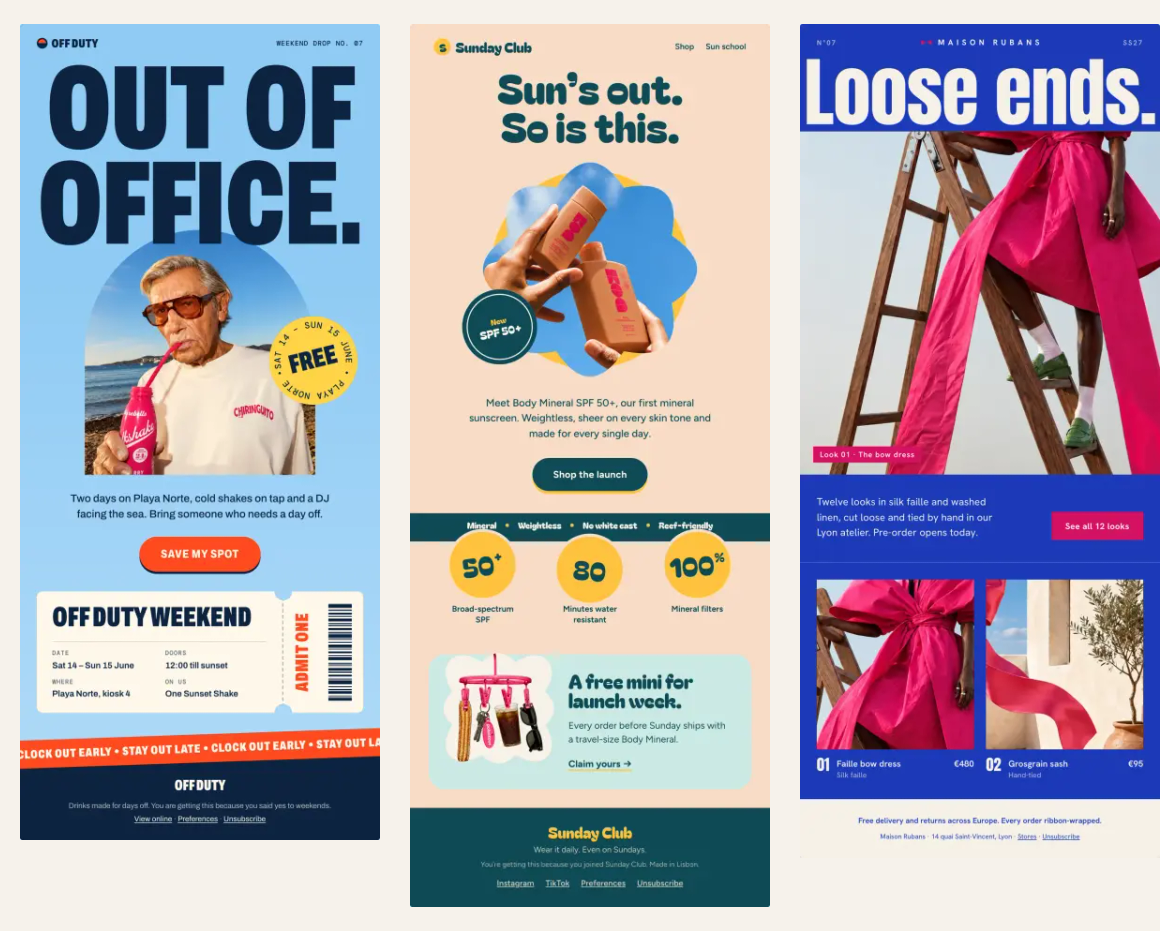
These are published Migma showcase designs, not customer campaign results. They demonstrate why visual output deserves its own evaluation. A striking image, balanced text, and an obvious action can work together in ways a paragraph of suggested copy cannot show. Your own product photos and approved facts should drive the design.
For an illustrative onboarding brief, try:
@Migma Use my saved brand. Create a three-email onboarding series for subscribers who asked to learn about our product. First explain the core use case, then address setup friction, then invite one next action. Use only approved claims. Show each preview and canvas link. Keep everything as drafts.
Read the whole series. Check that each message has a distinct purpose and that the later emails do not assume an action the subscriber has not taken. A generated series is creative work; it does not establish that a signup trigger or live automation has been connected.
Create, approve, send, and track
Once the design is right, review Email Preflight and the final audience. Migma checks links, writing, inbox previews, and common spam or delivery risks. Email clients can still render differently, and no check guarantees placement in the inbox.
Migma can send campaigns from the approved sending setup. The ChatGPT guide explains the approval link: review recipient count, sender, subject, and preview in Migma, then choose Send, Schedule, or Decline. Your conversation is the planning surface; the approval makes the intended delivery concrete.
After a real authorized send, ask ChatGPT to retrieve the campaign's results. Migma's reporting documentation covers delivery, clicks, recipient logs, click maps, and A/B results. Check the reporting period and use clicks alongside the actual campaign goal. Privacy-protected opens are directional context.
Keep the improvement small enough to understand. If readers reached a product page but missed the setup guide, the next email might bring that guide higher and explain its value more clearly. Ask Migma to prepare the revision, compare it, and approve the new version. Results inform later emails; Migma does not automatically choose an A/B winner or guarantee rising engagement after every send.
2. Klaviyo: Strong for answers grounded in your marketing account
Klaviyo's official ChatGPT integration brings live campaign and flow information into the conversation. Its published examples include finding strong campaigns, investigating unsubscribe changes, and examining revenue changes. The page also describes creating campaigns, assigning templates, and defining audiences from the conversation.
That makes it worth considering when your existing account data is the starting point. Ask for the period, campaign names, and definitions behind an answer, then check those against the account before acting. A revenue explanation is an analysis to review, not proof that a particular design caused the outcome.
Klaviyo and Migma can fit different parts of the same process. Choose Migma first when the task centers on creating and refining the visual email. Choose a Klaviyo account analysis when you need that platform's customer and campaign context. Check the final exported or assigned template in the platform that will send it.
Where Brevo fits
Brevo is a capable sending platform with campaign, contact, and template operations documented in its developer MCP guide. That page documents several MCP clients, including Claude Desktop and developer tools. Its Claude connector article separately explains draft creation and review in Brevo.
Those sources do not establish a native Brevo ChatGPT listing. If you already send with Brevo, retain a clearly reviewed handoff and verify any proposed ChatGPT connection against current official setup instructions. Do not paste account keys into an ordinary conversation to improvise access.
Compare plans using your actual workload
Check Migma pricing for generation credits, brand needs, and send limits. Check Klaviyo pricing against the active profiles and products you use, and Brevo pricing against the sending operation you intend to keep. Avoid choosing from a headline fee while ignoring the assistant's own access requirements or the cost of the underlying platform.
Start with one complete brief through the Migma ChatGPT guide. Inspect the actual preview, approve only the intended send, and bring the resulting evidence back into the next creative decision.
Frequently Asked Questions
How do I start using Migma in ChatGPT?
Open the public Migma listing through the current setup guide, install or connect it where supported, and complete the browser access review. Invoke @Migma and ask it to list your brands before changing anything. Availability depends on the account and workspace controls.
Does creating a series in ChatGPT activate an automation?
No. A generated series is editable creative. A live automation also needs a verified event source, correct routing and audience rules, and explicit activation. Review the sending setup separately from the email designs.
Is Brevo confirmed as a native ChatGPT integration here?
No native Brevo ChatGPT listing was verified for this comparison. Brevo’s official sources describe its sending platform, developer MCP server, and a separate Claude connector. Confirm current official setup instructions before relying on a ChatGPT connection.
How do campaign results improve future Migma emails?
Review delivery and engagement for the named campaign, choose an evidence-backed creative change, and ask for the next draft. Keep the comparison clear and approve it. Improvement is a reviewed process, not guaranteed engagement growth or automatic A/B winner selection.