ChatGPT can produce campaign angles, subject lines, and a polished first draft in minutes. The slow part returns when someone has to rebuild that answer as branded email, compare visual options, fix links and variables, check email clients, and prepare a campaign for approval.
AI email marketing from ChatGPT becomes useful when the prompt creates a real email artifact. Connect ChatGPT to Migma, give it a decision-ready brief, ask Migma for editable drafts and previews, then open the selected result for email-specific QA and a controlled handoff.
Short answer
ChatGPT is the campaign conversation. Migma is the email production layer.
| Job | ChatGPT | Migma |
|---|---|---|
| Explore campaign angle | Compare positioning, objections, and sequence options | Receive the approved brief |
| Apply brand context | Use facts supplied in the chat | Use the selected Migma brand and saved knowledge |
| Build editable email | General text or HTML output | Create editable email or a coordinated series |
| Show visual result | Discuss returned output | Return preview images and canvas links |
| Check email behavior | Reason from available context | Run email-specific review on the selected artifact |
| Prepare handoff | Invoke approved tools | Create a draft, export, test, or campaign action within permissions |
| Approve live action | Ask for confirmation | Keep sender, audience, timing, and final approval visible |
ChatGPT app and full MCP access depend on plan, workspace settings, role, and current product surface. OpenAI's developer-mode guide documents current availability and admin controls. Treat setup screenshots as guidance, not a permanent contract.
Why ChatGPT email drafts create more work
The prompt is rarely the whole campaign system. A useful production email also needs:
- Saved brand colors, fonts, logos, and voice
- Reusable, responsive email structure
- Working links and personalization fallbacks
- Mobile, dark-mode, Gmail, and Outlook review
- Consent, sender, unsubscribe, and domain checks
- A real destination for draft, export, test, or campaign
Raw HTML from a chat can still depend on browser CSS that email clients handle differently. Copy blocks still need visual assembly. A polished answer can contain an invented claim or wrong URL if the source brief was incomplete.
The workflow improves when ChatGPT must return previews and canvas links from Migma rather than treating prose as completion.
I use “email builder” narrowly here. It should create an editable artifact, return a visual result, support email-specific review, and provide a real handoff path. Copy generation alone leaves the build unfinished.
Connect ChatGPT to Migma
Follow Use Migma with ChatGPT. The guide covers the Migma app route when available and a custom Remote MCP fallback for workspaces that manage connectors.
1. Check workspace access
Confirm your plan and workspace allow Migma or custom apps. An admin may need to approve access. For full write actions, use only the permissions needed for the workflow.
Migma's hosted Remote MCP endpoint is:
https://migma.ai/mcp
Browser OAuth handles Migma sign-in. Do not paste a Migma API key into ChatGPT.
2. Review permissions
Read every requested permission before connecting. email:send can allow test and live sends. campaign:write can allow campaign creation, scheduling, or sending.
Start with the narrowest access that supports the first test. Keep ChatGPT confirmation controls enabled.
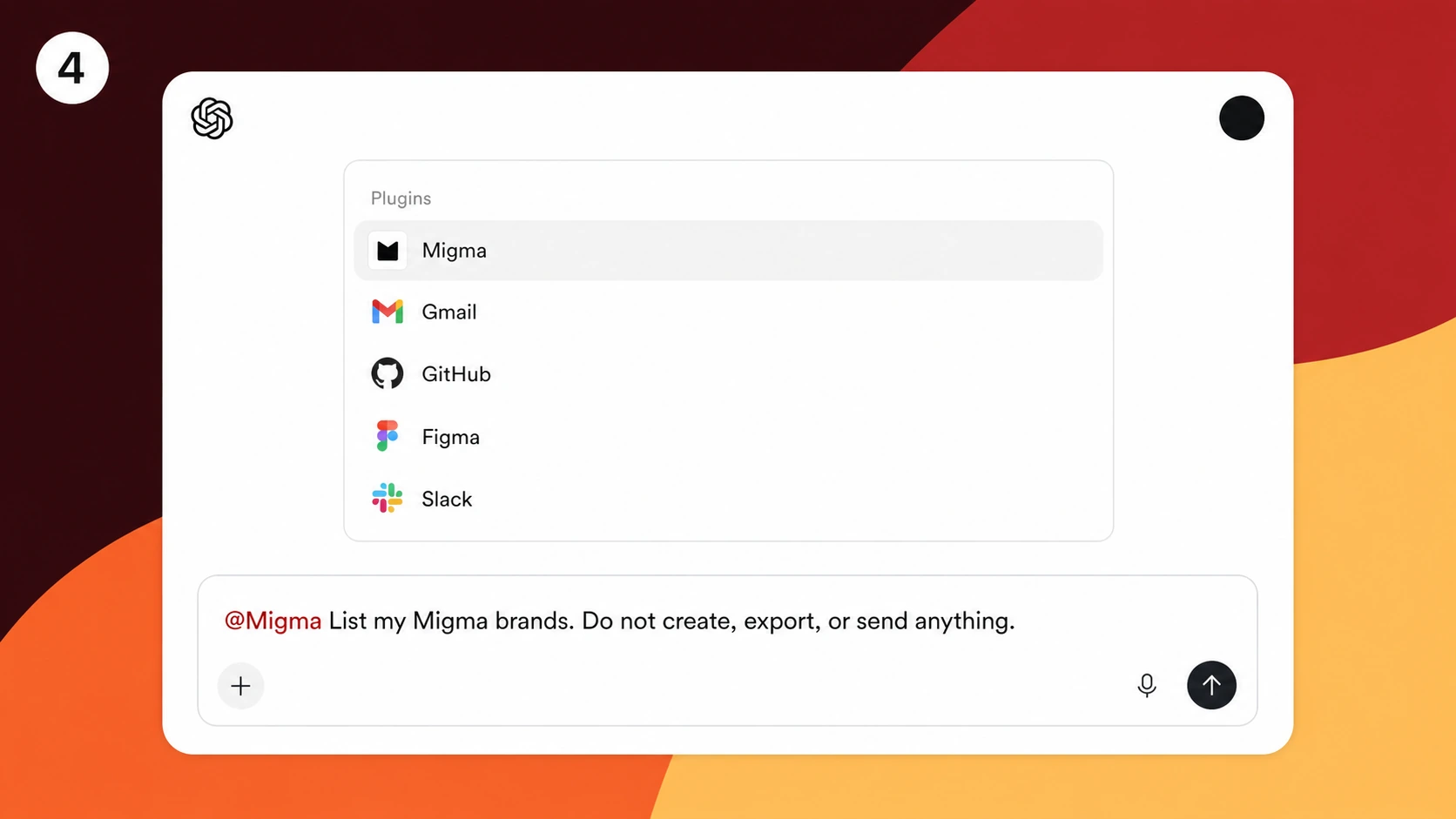
3. Verify with a read-only request
Ask:
@Migma list my Migma brands. Do not create, export, schedule, or send anything.
Confirm the expected brands appear before asking for a draft.
Build a decision-ready campaign brief
“Write a marketing email” forces ChatGPT to invent strategy. Give it facts and boundaries first.
Include:
- Audience and lifecycle stage
- Campaign goal
- Approved product facts and prohibited claims
- Offer, deadline, and CTA
- Customer objections
- Required links and variables
- Desired email count
- Completion condition
Example:
Review this launch brief before creating email. List missing audience facts, unsupported claims, unclear offer details, required links, personalization fallbacks, and approval risks. Ask only questions that would change the campaign.
After those questions are settled:
@Migma use the Acme brand. Create a three-email launch series for current trial users. Email one introduces team collaboration, email two answers the security objection, and email three gives a concise final reminder. Use only the approved facts and URLs above. Return preview images and canvas links. Do not send, schedule, or export anything.
That request separates planning, creation, and live action.
Review previews before rewriting copy
Migma can return preview images and direct canvas links. Use previews to judge composition, hierarchy, image treatment, CTA placement, and whether the sequence feels repetitive.
Open the canvas when a correction depends on spacing, alignment, mobile stacking, or visual balance. A transcript cannot show whether the hero dominates the email or whether three messages share the same layout.
Give one bounded correction brief:
Keep the audience, approved facts, offer, links, and email count unchanged. In email one, shorten the opening to two sentences and move proof above the CTA. In email two, make security the main objection. In email three, remove repeated feature copy. Vary the layouts while keeping one color and button system. Return updated previews. Do not send.
Review the new result against that request before adding unrelated changes.
Ask for an artifact, not only copy
A useful creation request returns:
- Editable email or series in Migma
- Preview image for each email
- Direct canvas link
- Clear record of which brand was used
- No live send unless separately approved
If ChatGPT returns only copy, ask it to invoke Migma and create the artifact. If Migma is unavailable in the current message, reselect or mention the app according to the current ChatGPT interface.
Run email-specific checks
After the design is approved, inspect the selected artifact in Migma:
- CTA and footer URLs
- Missing or unsafe variables
- Mobile hierarchy and text size
- Dark-mode contrast
- Outlook and Gmail warnings
- Grammar, claims, and offer details
- Sender identity and sending domain
- Opted-in audience and unsubscribe behavior
Ask ChatGPT to return blocking issues first when it invokes Migma checks. Then inspect the actual preview and send a controlled test to yourself. A tool summary is useful evidence, not a substitute for a received email.
Keep live sending separate
Do not end a broad content prompt with “send it.” A live campaign changes customer experience and sender reputation.
Use a two-step boundary:
- Create a campaign draft with subject, sender, recipient list or segment, and schedule visible.
- Review recipient count, sender, links, variables, unsubscribe behavior, and final previews before a separate approval.
Revoke the Migma connection key if ChatGPT should no longer act for the account. Disconnecting an app and revoking its Migma key are separate controls.
When ChatGPT is the right surface
Choose ChatGPT when campaign planning already happens in a ChatGPT workspace and the team has approved Migma access. It works well for prompt-led ideation, copy review, campaign sequencing, and turning attached briefs into draft artifacts.
Choose Claude for longer research sessions or Claude Design input. Choose Slack for team discussion and threaded review. Choose Telegram for mobile-first capture and quick draft changes.
If you also use Grok Bot desktop, follow the Migma connection guide for Grok Bot to connect your account and verify brand access.
Choose your chat surface
- AI email marketing from Slack: team briefs, channel context, and threaded feedback.
- AI email marketing from Telegram: mobile-first drafting and quick founder review.
- AI email marketing from Claude: research-heavy briefs and Claude Design work.
- AI email marketing from ChatGPT: prompt-led campaign planning and custom-app workflows.
Start with Migma's ChatGPT setup guide, verify access with a read-only request, then create one draft without any live-send instruction.
Frequently Asked Questions
Can ChatGPT create a complete marketing email?
ChatGPT can plan and write. Migma turns the approved brief into editable email artifacts with saved brand context, previews, email-specific checks, and a controlled campaign or export handoff.
How does ChatGPT connect to Migma?
Use the Migma app when it is available in your workspace, or the hosted Remote MCP endpoint at https://migma.ai/mcp where custom connectors are allowed. Complete browser OAuth and never paste a Migma API key into ChatGPT.
Why can I not find Migma in ChatGPT?
Availability depends on plan, workspace settings, role, region, and current ChatGPT surface. Check Migma's current setup guide and ask a workspace admin whether apps or custom connectors are enabled.
Can ChatGPT send a campaign through Migma?
A connection with send or campaign permissions can expose consequential actions. Keep creation separate from live approval, review sender and recipients, and use a distinct confirmation for any send or schedule.
Does ChatGPT use Claude Design import?
No. Claude Design zip import is a Claude-specific workflow. ChatGPT's main Migma path is the app or hosted Remote MCP connection.