Migma is our best overall Claude integration for marketers who want to turn a campaign idea into a designed email, approve the send, and use the results to improve the next campaign. Brevo is a strong choice when your sending operation already lives there. Klaviyo deserves a close look when customer data, ecommerce reporting, and flow analysis drive your work.
This comparison is published by Migma. Our ranking prioritizes visual email creation, persistent brand context, review before sending, and a useful path from results to the next design. It is an editorial recommendation for that workflow, not an independent performance benchmark. Product pages were checked on November 5, 2026.
The best Claude integrations for email marketing
| Integration | Best fit | What to check before choosing |
|---|---|---|
| #1 Migma: Best overall | Branded email creation through approved sending and reviewed improvement | Brand setup, design credits, sending allowance, and permissions |
| #2 Brevo | Teams managing email and SMS campaigns in Brevo | Claude saves drafts; send and schedule from Brevo |
| #3 Klaviyo | Teams using customer and campaign data to plan ecommerce marketing | Which account data and actions your connector exposes |
Choose around the work you need finished. A campaign report, a copy draft, and an editable designed email are different outputs. Ask each integration to perform your real task before moving the whole workflow.
1. Migma: Best overall for creating the email and taking it forward
Migma connects the creative and operational parts of email marketing. Its Claude directory listing describes brand import, email previews inside the conversation, audience segments, approved campaign sending, and results that inform the next brief.
Start with your website and review the imported brand identity. Useful context includes your logo, colors, fonts, voice, products, and approved offer details. Save lasting facts so the next email starts with that context instead of another long explanation.
Then ask for an actual email. Migma prepares the design and copy, with a preview to inspect and an editable canvas for changes. You can describe a change in Claude or work directly in Migma's visual editor. This matters when your bottleneck is producing a finished branded message rather than finding another subject line.
See the kind of email design we mean
The examples below come from Migma's own published showcase. They illustrate visual output, not customer performance or a measured comparison with competitors.
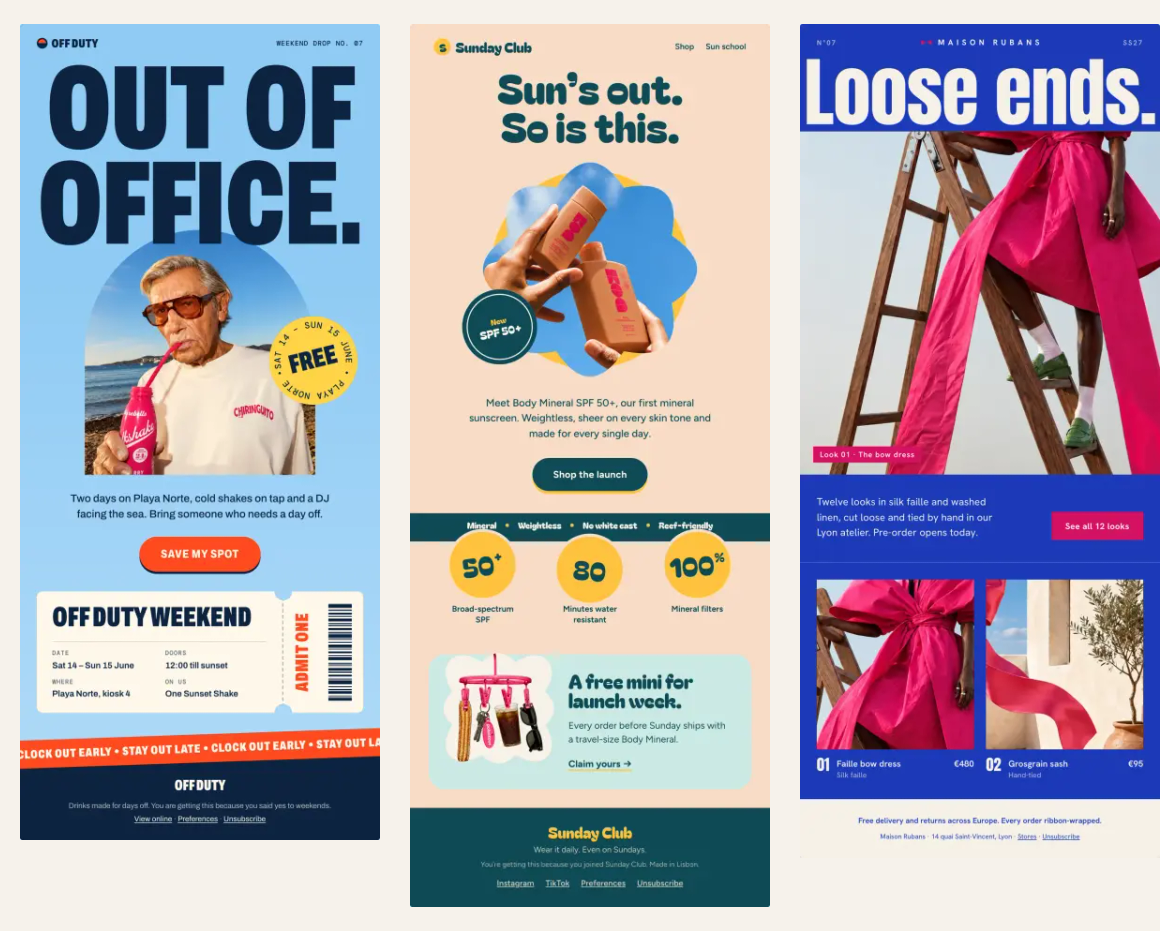
Look at the differences: a campaign can lead with one large photograph, use a quieter editorial arrangement, or present products as a coordinated lookbook. For your own brief, specify the reader, approved facts, product imagery, and one primary action. Judge the result by hierarchy, legibility, brand fit, and whether the button leads to the promised next step.
A useful first prompt is:
Use my saved brand. Create a weekend launch email for opted-in subscribers, with our approved product photos and one primary shopping CTA. Show the complete preview and canvas link. Keep it as a draft.
The published Claude workflow includes illustrative conversations and sample data. Its sample audience and campaign rates are demonstrations, not results you should expect.
Send when approved, then learn from the result
Migma can send the finished campaign. The setup guide explains the approval link: review the audience, recipient count, sender, subject, and final preview in Migma, then choose Send, Schedule, or Decline. Connecting Claude or creating an email does not authorize delivery by itself.
Before sending, use Email Preflight to review inbox previews, links, writing, and common delivery risks. Migma prepares email-safe HTML for major clients, but inboxes can still differ. Neither an attractive preview nor a passed check guarantees inbox placement.
After sending, ask for delivery, clicks, bounces, and other campaign results. In Track Results, Migma documents human click maps, recipient activity, and side-by-side A/B results. Use that evidence to decide what to change next. Opens need context because privacy protections can inflate them.
This is how emails can get better over time: keep the useful brand context, review what readers did, and carry an accepted lesson into the next draft. For example, if readers click a product link buried low in the message, test moving that product higher while keeping the offer stable. Migma does not automatically select A/B winners, and a live email does not rewrite itself.
2. Brevo: A strong choice for an existing sending operation
Brevo's official Claude connector guide shows a practical loop: ask about contacts or campaign results, turn the answer into an email or SMS draft, and save it in Brevo.
The important boundary is explicit. This connector reads account data and creates drafts; sending, scheduling, and deleting stay in Brevo. That can suit a team whose reviewers already work there. It is not evidence that Brevo lacks sending: Brevo is the sending platform, while its Claude connector has a narrower role.
Use a precise audience and reporting period in prompts. Request a draft based on accepted findings, then inspect the final campaign in Brevo. Its broader developer MCP server is a separate connection with its own exposed tools; do not assume it shares the directory connector's restrictions.
3. Klaviyo: A strong fit for customer-data-led planning
Klaviyo's Claude integration page emphasizes live account data, campaign reporting, segment-informed copy, and flow audits. These are useful strengths when the marketing question is which audience or lifecycle problem deserves attention next.
An ecommerce team already using Klaviyo can begin with a specific report or flow audit, check the findings against the account, and use the accepted evidence as a creative brief. Evaluate the connector's current actions separately from Klaviyo's wider platform features. We did not run a controlled head-to-head design or conversion test.
Check the whole cost and try one campaign
Compare your Migma plan, Brevo plan, and Klaviyo plan using your actual generation needs, audience, sending volume, and account requirements. The assistant's subscription and the connected product's limits are separate considerations. A connector being available does not make every campaign operation unlimited.
For a creative-first workflow, start with Migma in Claude. Bring one approved brief, inspect the designed email, and review its sending details. After an authorized campaign has results, ask for one specific next experiment rather than an unsupported promise of automatic growth.
Frequently Asked Questions
Can Claude send a Migma campaign without my approval?
Migma provides an approval link for the proposed send. Review the audience, sender, subject, and final preview in Migma, then choose Send, Schedule, or Decline. A generated email remains a draft until the sending steps are approved.
Can Brevo’s Claude connector send or schedule campaigns?
Brevo’s official directory-connector guide says it reads account data and creates email, SMS, and template drafts. Sending, scheduling, and deleting remain in Brevo. Its developer MCP server is separate and exposes its own tools.
Do Migma emails automatically rewrite themselves after sending?
No. Use reviewed results to improve the next brief and draft. Migma documents click maps and A/B comparisons, but does not automatically choose the A/B winner or change a live email based on engagement.
Which integration should an existing Klaviyo team try?
Use Migma when the immediate task is creating and refining the visual email. Klaviyo’s Claude integration is useful for live account reports, segment-informed copy, and flow audits. Test the exact task and review the final result in the sending platform.