Why General AI Fails at Email (And How Migma Fixes the "70% Trap")
If you ask a modern Large Language Model (LLM) like Claude or ChatGPT to write a marketing email, it will give you something that looks remarkably good in your browser. The copy is punchy, the layout seems clean, and the CTA button is right where it should be.
But there is a "70% trap" in AI-generated content. In a browser, the email looks 100% ready. In a real-world inbox—specifically Outlook for Windows or the Gmail mobile app—that same email often arrives broken, unstyled, or legally non-compliant. Recent industry benchmarks show that even the most advanced models rarely score above a "D+" when graded on production-ready email code.
At Migma, we believe the problem isn't the AI’s intelligence; it’s the lack of context. To move from a "draft" to a "sendable campaign," you need more than a prompt. You need a system that understands the quirks of 40+ email clients and the specific DNA of your brand.
The Browser Preview is a Lie
The biggest hurdle in email production is that "HTML for the web" and "HTML for email" are two different languages. Web browsers are forgiving and standardized. Email clients are a fragmented mess of legacy rendering engines.
When a general AI generates email code, it often uses modern CSS that works in Chrome but fails silently in Yahoo or AOL. It might forget to inline styles, causing the Gmail app to strip all branding entirely. Most dangerously, general AI treats legal requirements like CAN-SPAM (unsubscribe links and physical addresses) as optional suggestions rather than hard constraints.

Migma solves this by moving away from "zero-shot" code generation. Instead of asking an AI to guess how to code a button, Migma uses a Custom Email Compiler. We treat your email as a structured blueprint. The AI handles the creative intent, but our engine handles the execution, ensuring every line of code is optimized for accessibility and cross-client compatibility.
Beyond Copy: The Power of Brand Memory
Most AI tools suffer from "Brand Drift." On Monday, the AI sounds like your brand; by Wednesday, it’s drifted into a generic corporate tone. This happens because general LLMs don't have a long-term memory of your specific style, spacing, or visual hierarchy.
Migma introduces Brand Memory. By importing your URL, Migma doesn't just grab your logo; it learns your palette, your typography, and your "voice."
- One-Click Import: Paste a URL to sync your entire visual identity instantly.
- Knowledge Base: Store your brand guides and past successful campaigns so the AI knows what "good" looks like for you.
- Asset Library: Your approved icons and retina-ready images are always at the AI's fingertips.
The Creative Studio: Images That Actually Fit
One of the most frustrating parts of email creation is the "tab-switching tax." You generate copy in one tool, create an image in another, and then realize the image dimensions don't fit your email layout.
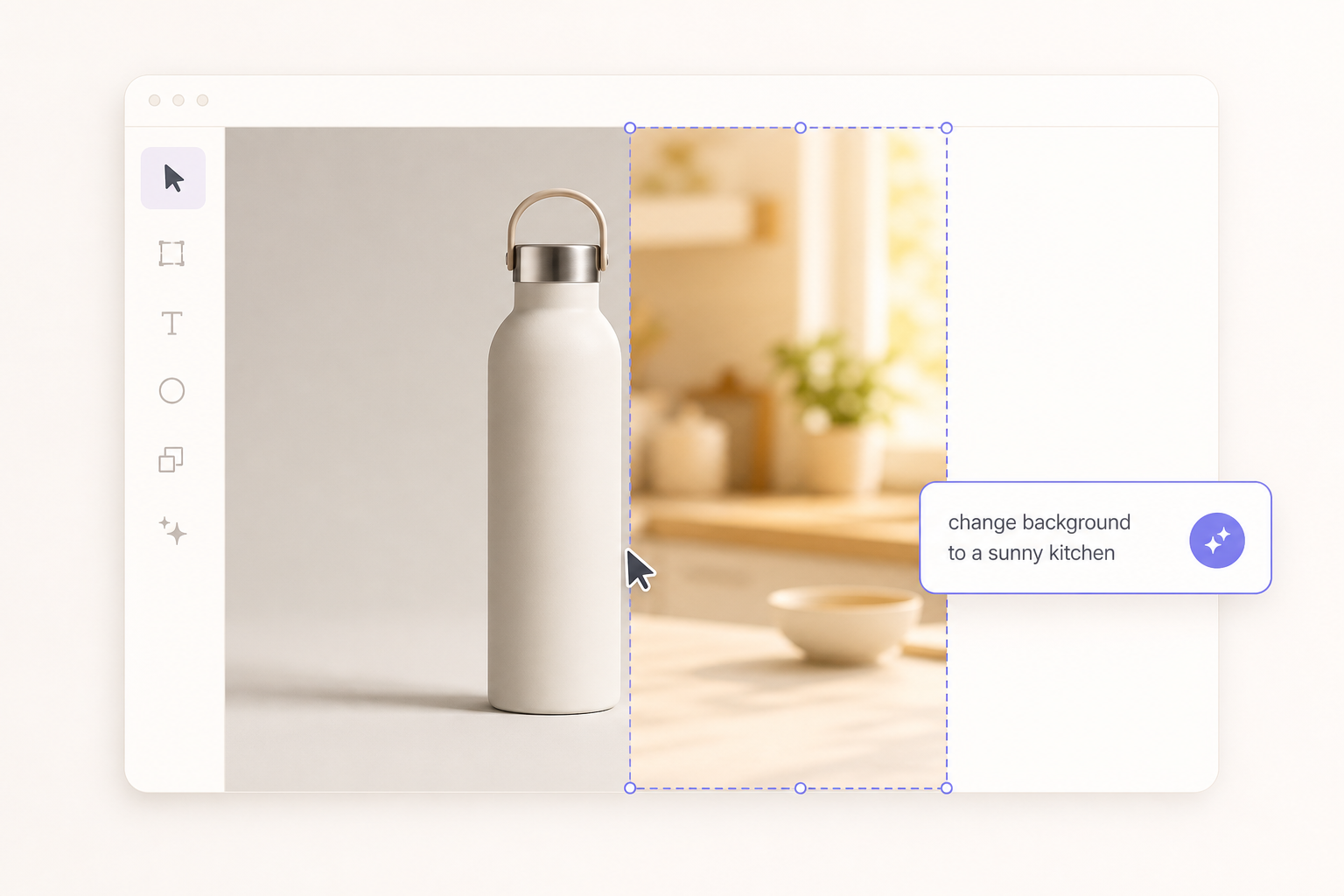
Migma integrates a Creative Studio directly into the workflow. You can generate and edit images using natural language without leaving the editor. Need to change the background of a product shot or recolor an element to match your brand's new seasonal palette? You just ask.
Key Creative Features:
- AI Image Retouching: Remove backgrounds or recompose images instantly.
- Retina Export: Automatically ensures images look crisp on high-resolution mobile screens.
- React-icons Support: Access thousands of consistent icons that render perfectly in every inbox.
Preflight: The Safety Net for Marketing Ops
In a high-growth SaaS or e-commerce team, the cost of a mistake is high. A broken link or a missing unsubscribe button isn't just embarrassing; it can lead to massive fines and deliverability death spirals.
Migma’s Email Preflight acts as an automated QA lead. Before you export to Klaviyo, SendGrid, or Resend, Migma runs a multi-point scan:
- Brand Voice Guard: Scores your tone to ensure it hasn't drifted from your guidelines.
- Link Validator: Checks every URL for 404 errors and slow response times.
- Compatibility Checker: Runs a "single-scan" test across 40+ clients, showing you exactly how your email looks in Outlook 2016 vs. iPhone 15.
Integration Without Friction
The best tool is the one that fits into your existing stack. Migma isn't a walled garden. Whether you are a developer using our API v1 and MCP connectors to pull live data from Notion or Google Drive, or a marketer syncing products directly from Shopify, the goal is the same: launch-ready marketing in seconds, not hours.
Why Teams are Switching to Migma:
- Speed: Go from a URL or a prompt to a finished HTML email in ~30 seconds.
- Consistency: No more "Times New Roman" fallbacks in Outlook.
- Scale: Manage localization and multi-language campaigns (including RTL support) with a single click.

Conclusion: The Future of Email is Structured
The era of "guessing" if an email will work is over. By combining the creative flexibility of AI with the rigid reliability of a dedicated email engine, Migma allows teams to produce at 10x the speed without the 70% failure rate of general tools.
If you’re ready to stop fixing broken HTML and start shipping better campaigns, it’s time to move your workflow into Migma.
Ready to see the difference? Explore Migma today.